วิธีการเชื่อมต่อบัญชีกับ Bitkub Connect ผ่าน Line @bitkubconnect
 Medium
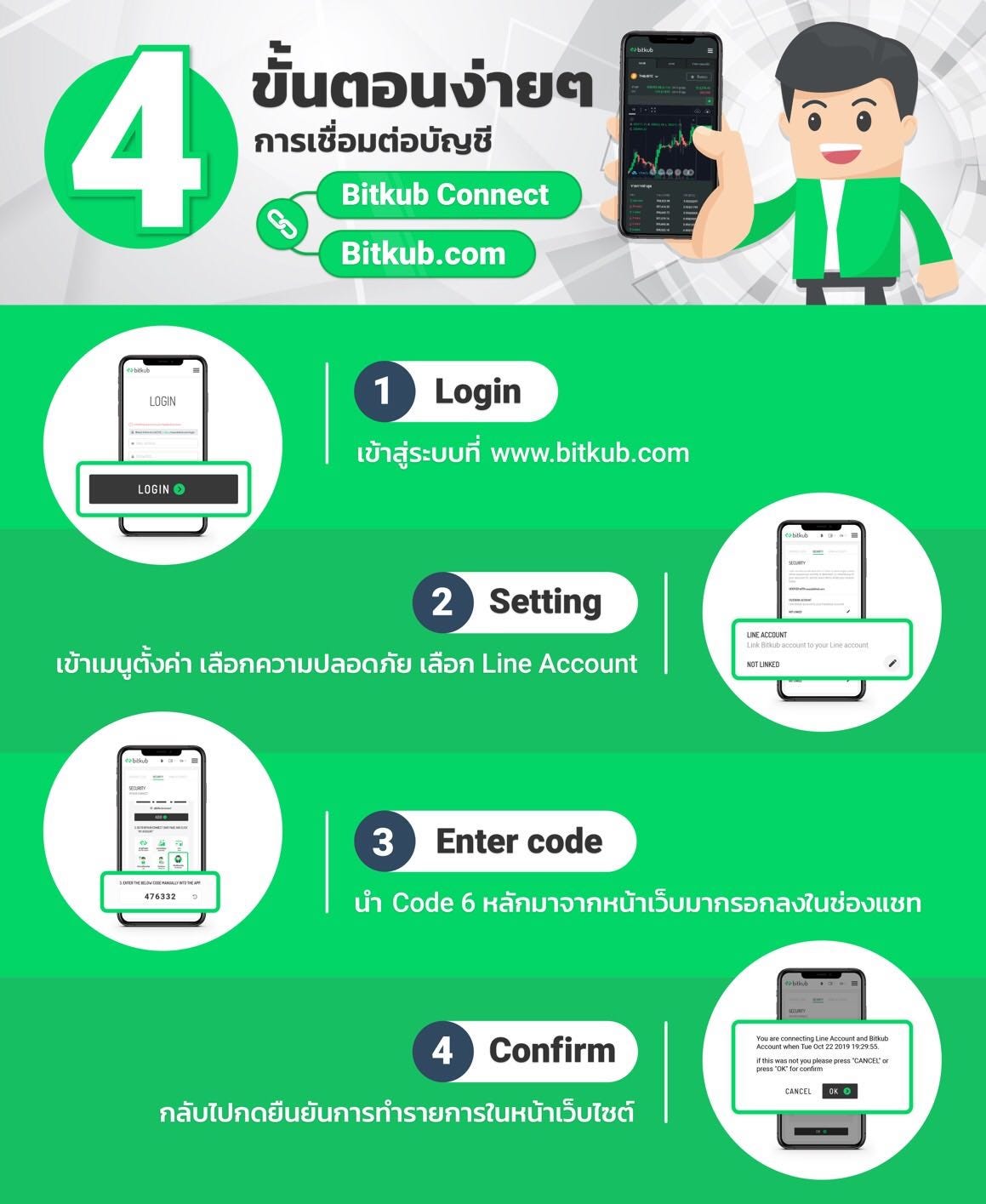
How to link your Line Account with Bitkub Connect
คุณสามารถเชื่อมต่อบัญชีคุณง่ายๆ พร้อม “บอกเก่ง” ทุกเรื่องการ ฝาก/ถอน/เทรด ผ่าน Line : http://nav.cx/1mDwb0z
4 ขั้นตอนการเชื่อมต่อบัญชี กับ Bitkub Connect
1.เข้าสู่ระบบผ่าน Bitkub.com/login
2.เข้าสู่เมนู “ตั้งค่า” , เลือก “ความปลอดภัย” และ กดปุ่ม “Link Account”
3.นำ รหัส 6 หลักจากหน้าเว็บไซต์มากกรอกลงในช่องแชท Line @bitkubconnect
4. รอกล่องขึ้นภายใน 5 วินาที และ กด “ยืนยัน” บนหน้าเว็บไซต์
เพียงเท่านี้การเชื่อมต่อกับบัญชีของท่านก็เสร็จสมบูรณ์และรอรับการแจ้งเตือนของเราได้เลย หรือท่านใดที่ยังประสบปัญหาในการเชื่อมต่อสามารถอ่านรายละเอียดเพิ่มเติมได้ที่นี่ : https://support.bitkub.com/hc/th/articles/360035194492
4 easy steps to subscribe to ‘Bitkub Connect’
Login to your Bitkub account: Bitkub.com/login
Click “Setting”, “Security” and then click “Link Account”
Put the 6 digit code from Line to the website
Wait around 5 minutes for the notification to appear on your bitkub screen then click “Agree”
Congrats! You can now access Bitkubconnect!
Latest blog posts


Nvidia Perps Plunge 10% on Hyperliquid Amid Executive Rumors
Nvidia perpetual contracts dropped 10% on Hyperliquid following media reports concerning CEO Jensen Huang.
|


Japan Nears Rate Hike: Will Bitcoin and Stocks Suffer?
Japan's inflation surprised to the upside in October, increasing the likelihood of a Bank of Japan interest rate hike that could ripple through global financial markets.
|

Solana Company Reports Q3 Revenue Surge Driven by Staking
Digital asset treasury firm Solana Company posted $3.4 million in Q3 revenue, up from $697,000 during the same period last year.
|